To write voiceover in a script, put the narration in the audio column of a two-column script, directly across from the visual it plays over, and label it with the speaker's name followed by (V.O.) Add notes on how each part should be read, and the voice talent has what they need to get it right on the first pass.

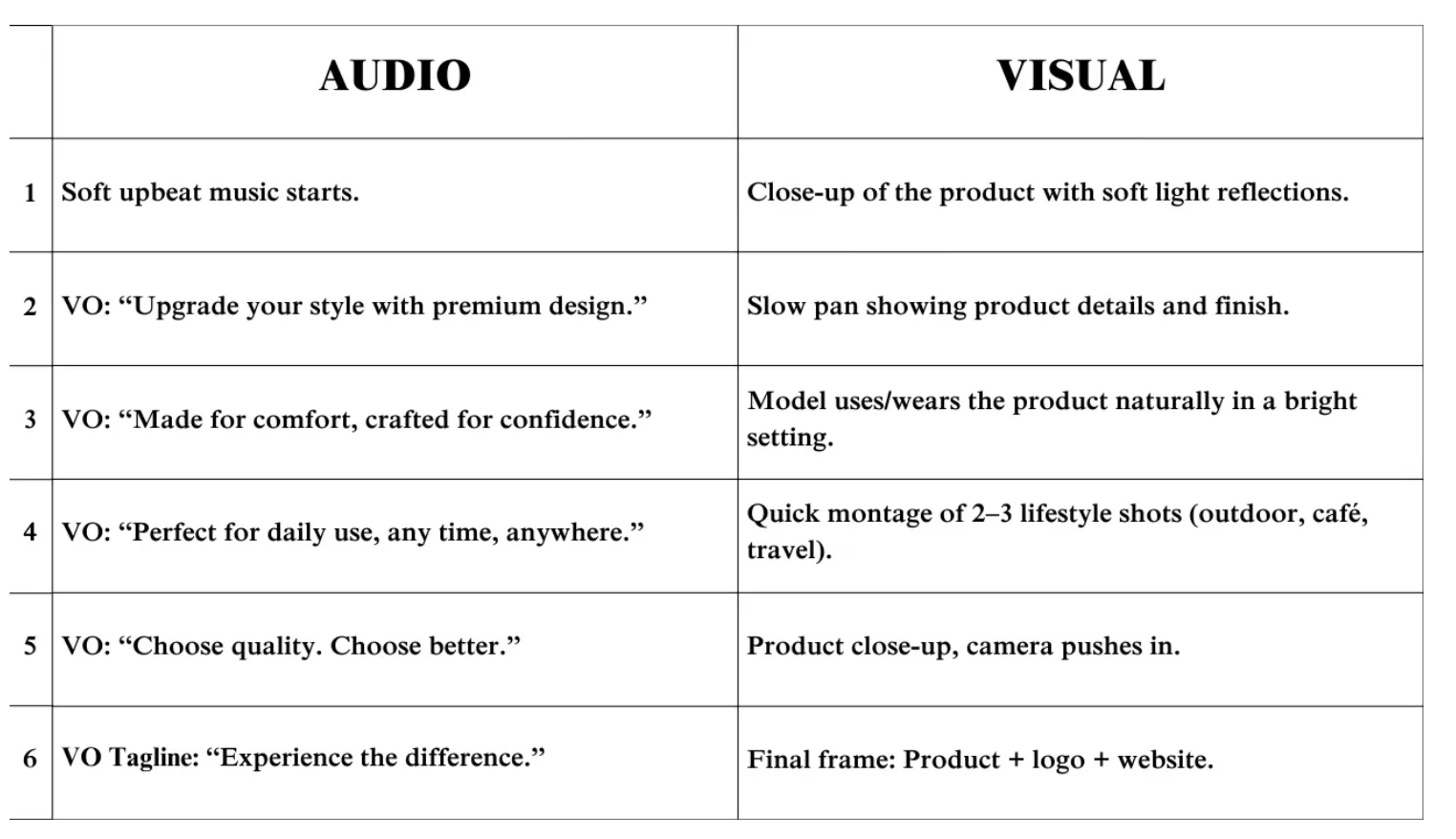
Use a two-column script
I've been handed scripts in every format, and the two-column version is the one I prefer. Visuals go in one column and audio goes in the other, with each line of voiceover next to the shot it belongs to. MasterClass lays out the same two-column AV script format for commercials, with the audio column on the right.
The reason I like it is simple. The talent can see what's happening on screen as they read. A line over a slow product shot gets read differently than a line over a fast montage, and the layout tells them which one they're voicing without anyone having to explain it.
How to label the voiceover line
Write the speaker's name, then (V.O.), then the line. It looks like this:
ANNOUNCER (V.O.): Fresh bread, baked every morning before you're awake.
Film and TV screenplays use the same tag next to the character's name. V.O. is for a voice that isn't part of the scene, like a narrator. O.S. is for a character who is in the scene but off camera. If you're writing a screenplay, Celtx has a full guide to V.O. and O.S. screenplay formatting.
Write the copy for the medium
Voiceover copy needs to be written a little differently depending on where it's going to be used.
A documentary should sound factual.
A commercial should be written with more emotion.
E-learning should be clear and steady so people can follow along.
Characters and games are written with far more acting in mind.
That last one is its own skill for the writer and the talent. I covered the casting side in my post on how to find voice actors for animated videos. For ad copy, the voice has to fit the brand as much as the words do, which I get into in choosing voice actors for commercial ads.

Add notes on how it should be read
Unless the script is simple, send a document with notes about how each part should be read. Tell the talent where you want more energy and where the emotion changes. If a section should feel a certain way, say so in plain words next to that section.
Send audio for hard-to-pronounce words
Brand names, medical terms and people's names get mispronounced all the time. A short audio file of you saying the word correctly is faster and more reliable than a phonetic spelling. Record it on your phone and upload it with the script.
Share the rough cut
If a rough cut of the commercial or video exists, give the talent a link to it. Hearing the music and seeing the pace of the edit tells them more about the read than a page of description.

Mark up the script with an app
Several apps make it easy to add notes for the talent right on the script. The ones I'd point people to are Scriptation, iAnnotate, Acrobat, WriterDuet and Celtx.
Scriptation carries your notes over when the script gets revised, which saves you from marking up every new draft. iAnnotate turns a Word or Google Docs file into a PDF you can highlight and write on. Voices.com has a longer roundup of voiceover script markup apps with the devices each one works on.
What people miss
Most script problems come from writing for the eye. The talent has to say every character on the page out loud, so anything unclear turns into a guess.
Instructional designer Christy Tucker's list of common voiceover script pitfalls matches what I've seen in sessions. Numbers and abbreviations cause the most trouble. Here is how to avoid the usual ones:
Write numbers the way you want them said. "2026" can be read two ways.
Spell out abbreviations, slashes and symbols as spoken words.
Mark the word you want stressed. You know how the line sounds in your head, and the talent doesn't.
Read the script out loud before you send it. You'll hear the clunky sentences right away.
Length is the other big one. A script that fills every second leaves no room for pauses, and the read ends up rushed. My guide to how many words fit in a 30 or 60-second voiceover script gives you the counts to aim for.
Sending your script through Voice Dragons
On Voice Dragons, you upload the script as a Word file and the site gives you the word count. Then you attach the two-column document along with any notes, audio files or links you have for the talent.
If it's a larger project, we can audition voice samples for you. If you've already found the voice you want, have them read a sample of the script before they record the whole thing. You can give direction on the sample if it isn't exactly what you're after, and the full read comes back much closer.
Every job has its own messaging thread, so questions from the talent get answered before they record. If you haven't worked this way before, I walk through hiring remote voice talent online in another post.
Key Takeaways
- Write voiceover in the audio column of a two-column script, next to the visual it plays over.
- Label each line with the speaker's name followed by (V.O.).
- Write the copy for the medium. A documentary reads factual, a commercial carries more emotion, and character work needs acting.
- Send notes on how each part should be read, plus an audio file for hard-to-pronounce words and the rough cut if you have one.
- Write numbers and abbreviations the way you want them spoken, and read the script out loud before sending it.
- On Voice Dragons, upload a Word file for the word count, attach your two-column script and notes, and ask for a sample read before the full recording.